The app
Ambience — a living writing backdrop
Calliope can give your writing surface a quiet, living backdrop that reacts as you write. It's subtle by design and completely optional — off unless you turn it on.
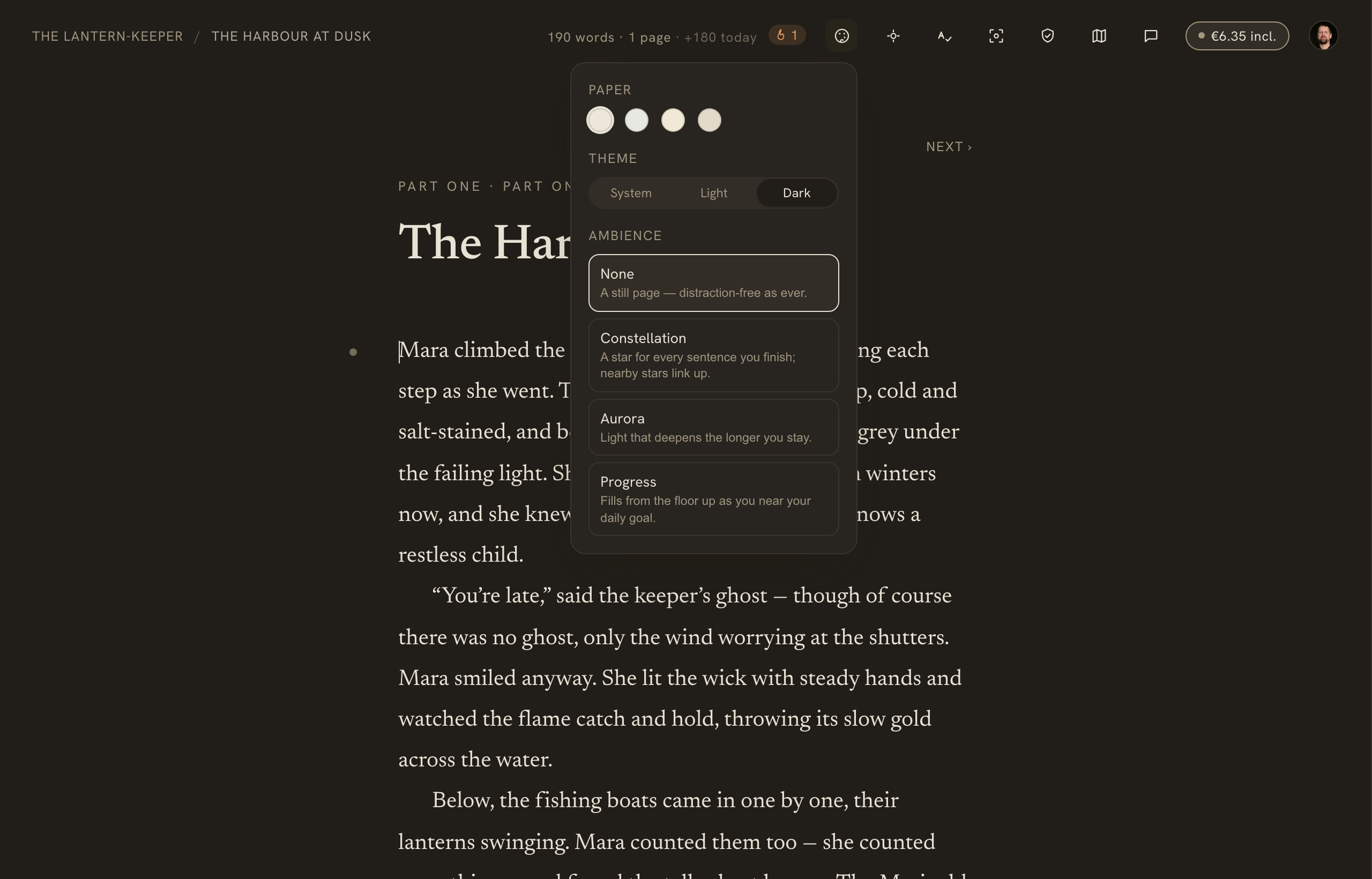
Ambience lives in the editor's Appearance menu, alongside paper tone and light/dark theme.
On this page
Distraction-free writing has always been calm — but the page never gave anything back for the act of writing. Ambience makes the ground behind your prose react, slowly and subtly, to writing itself: a peripheral reward you notice when you look up, never a thing you sit and watch. It’s the opposite of a gamified dashboard, and it’s off by default.
Choosing an ambience
Ambience lives in the editor’s Appearance menu — the small palette control in the top bar (and in the ⋯ action sheet on a phone), alongside your paper tone and light/dark theme.
- In the editor’s top bar, click Appearance.
- Under Ambience, pick one of the options below.
- Set the Intensity — Subtle, Balanced, or Bold. Balanced is the default, calibrated to read as quiet.
The four ambiences
- None (default) — a still page, distraction-free exactly as before.
- Constellation — a faint star appears for every sentence you finish; nearby stars link into a slowly growing constellation across the sky around your prose.
- Aurora — barely-there, soft-blurred bands of light that deepen the longer you stay in a writing session.
- Progress — a soft grid that fills from the floor up as you approach your daily word goal.
Each one is a frozen preset — a curated look, not a box of effects to tune. The single Intensity dial is the only knob.
What to expect
- It’s off by default and entirely optional — nothing appears unless you choose it.
- It’s a per-device preference, saved in your browser like your paper theme and light/dark choice. It isn’t synced across devices and isn’t tied to a particular book.
- It’s subtle on purpose: it lives at the edges and in the ambient light, moves over seconds and minutes, and never chases your cursor or flashes for attention.
- It works whether you’re signed in or writing anonymously.
Progress needs a daily goal. If no daily word goal is set on the book, the Progress ambience has nothing to fill — set one on the Goals & targets page (the Appearance menu shows a small hint in that case).
Related
- The writing canvas — paper themes, light and dark, and focus mode
- Goals & targets — set the daily goal that the Progress ambience fills toward